 jperez
How to Report Incorrect Property Record Information in iMAPP
If you find incorrect property record information in iMAPP, such as deed details, ownership details, or public record data that appears on the wrong property, you can report it directly through iMAPP's Help feature.
Use the Help: Data Quality Issue request type while viewing the property record with the error. This sends the issue to iMAPP support for review.
Before You Begin
Open the property record in iMAPP where the incorrect information appears.
Have a short description of the error ready.
If available, include the correct public source or county record reference in your request.
💡 Note: BeachesMLS cannot directly change county public records. Submitting a data quality issue through iMAPP alerts the iMAPP support team so they can review the information shown in the iMAPP report.
How to Submit a Data Quality Issue in iMAPP
1. Open the property record in iMAPP. Confirm you are viewing the record that contains the incorrect property information.
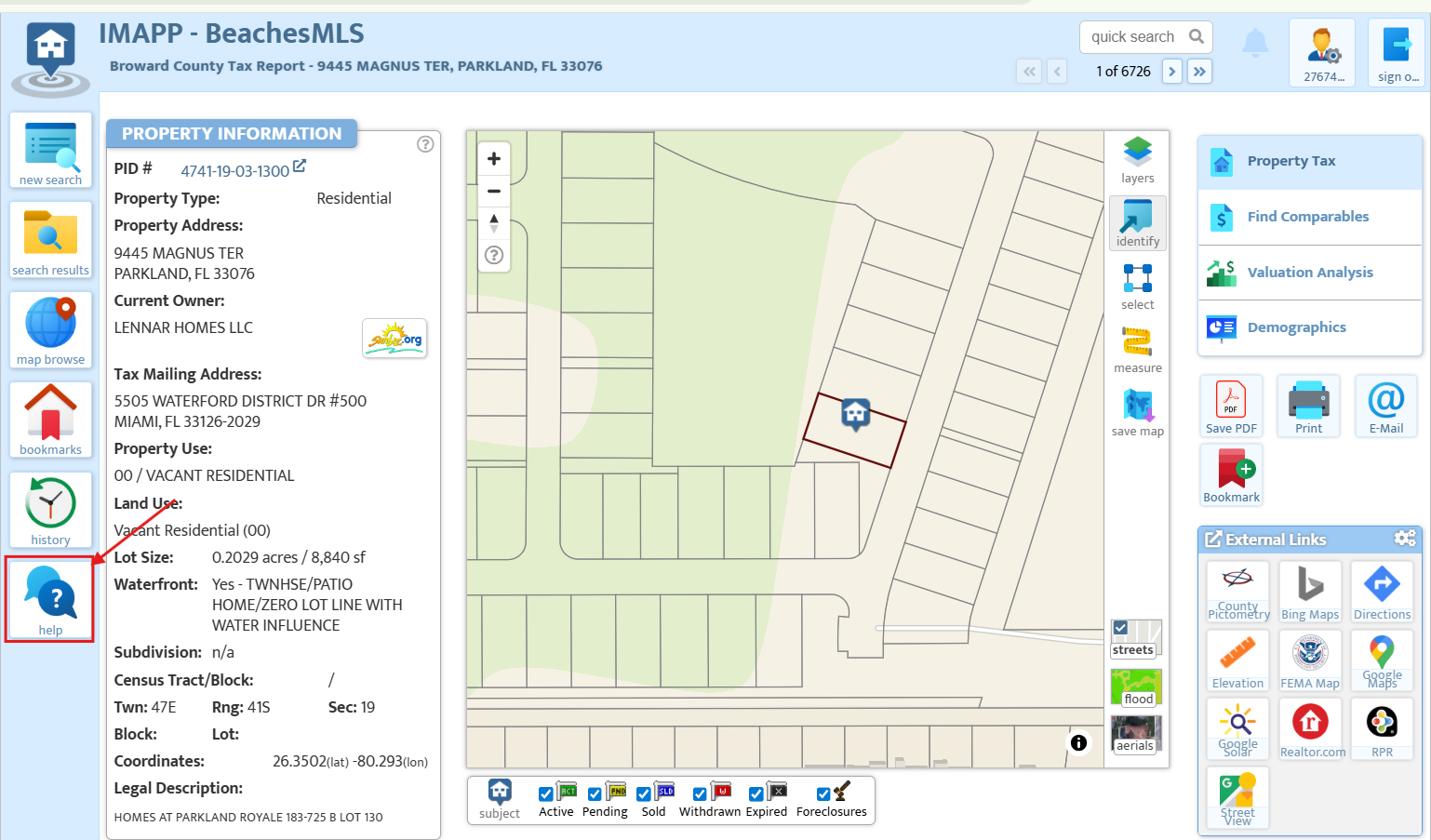
2. Select Help. The Help icon appears near the bottom of the left side toolbar. The Instant Answers window will open.
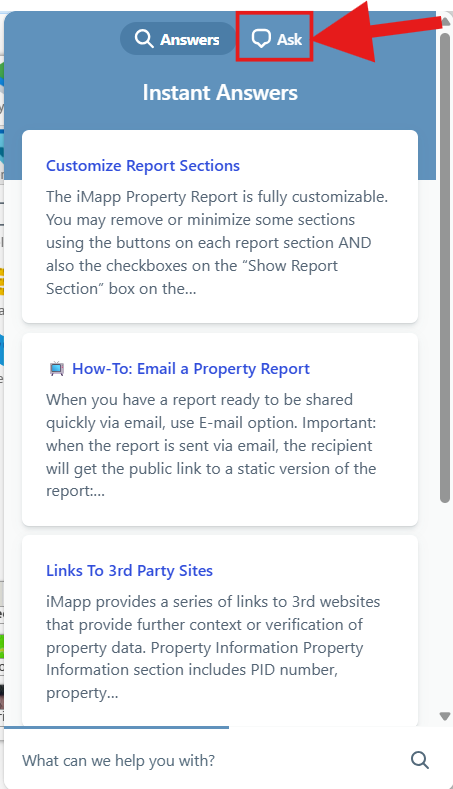
3. Click the Ask tab. In the Instant Answers window, select Ask to submit a request.
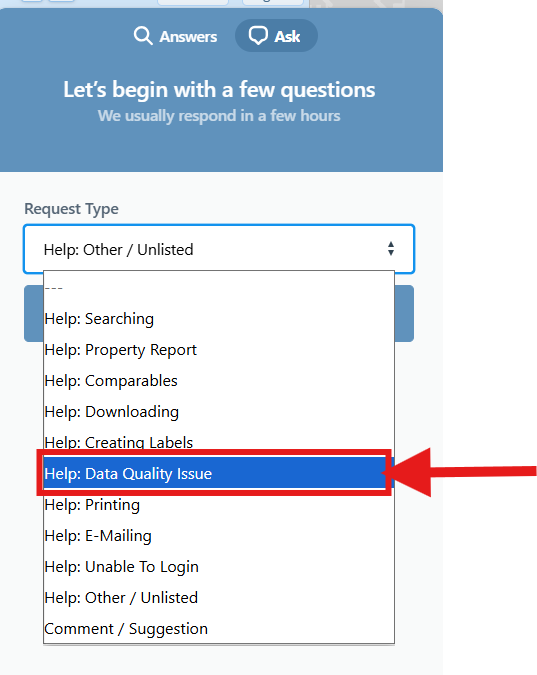
4. Choose Help: Data Quality Issue. Under Request Type, select Help: Data Quality Issue from the drop-down menu.
5. Describe the issue. Include what information is incorrect and what should be reviewed. Avoid including sensitive personal information unless it is required to identify the record.
6. Submit the request. iMAPP support will review the data quality issue and follow up through the request channel.
Frequently Asked Questions
Q: Can BeachesMLS remove incorrect deed information from iMAPP for me?
A: BeachesMLS support can guide you to the correct reporting option. Data quality corrections for iMAPP should be submitted through the Help: Data Quality Issue option inside iMAPP.
A: BeachesMLS support can guide you to the correct reporting option. Data quality corrections for iMAPP should be submitted through the Help: Data Quality Issue option inside iMAPP.
Q: What information should I include in the request?
A: Include the property record you are viewing, what appears to be incorrect, and any official county or public record details that support the correction.
A: Include the property record you are viewing, what appears to be incorrect, and any official county or public record details that support the correction.
Q: Should I contact the county office too?
A: If the county public record itself is wrong, contact the county office directly. If the county record is correct but iMAPP shows different information, submit a data quality issue in iMAPP.
A: If the county public record itself is wrong, contact the county office directly. If the county record is correct but iMAPP shows different information, submit a data quality issue in iMAPP.
Q: How fast will the correction appear?
A: Review times can vary. iMAPP support will review the submitted data quality issue and respond through the request channel.
A: Review times can vary. iMAPP support will review the submitted data quality issue and respond through the request channel.
Troubleshooting
I do not see the Help option
Make sure you are inside an iMAPP property record. If the Help icon still does not appear, refresh the page or try another browser.
I do not see Help: Data Quality Issue
Choose the closest available help request type and explain that the issue is a data quality correction. Include enough detail for iMAPP support to review the record.
Submit the issue through iMAPP’s Help feature so the support team can review the record.
Note: For assistance in Spanish, please contact our support team.
Nota: Si necesita ayuda en español, comuníquese con nosotros llamando al 561-585-4544, enviando un correo electrónico a MLSSupport@rworld.com, o mediante el chat en rworld.com o a través del Dashboard. Estaremos encantados de asistirle.
Nota: Si necesita ayuda en español, comuníquese con nosotros llamando al 561-585-4544, enviando un correo electrónico a MLSSupport@rworld.com, o mediante el chat en rworld.com o a través del Dashboard. Estaremos encantados de asistirle.